Best Wireless Presentation Clickers: Powerful Tools for Confident and Smooth Presentations


Best wireless presentation clickers are useful tools for teachers, speakers, trainers, students, business professionals, and event presenters who want better control during a presentation. A good presentation clicker allows you to move through slides without standing beside your laptop all the time.
A wireless presentation remote can make your delivery look more professional, but choosing the wrong one can create problems. Weak range, poor button design, battery failure, or connection issues can disturb your flow. That is why understanding the main features before buying is important.
What Are Wireless Presentation Clickers?
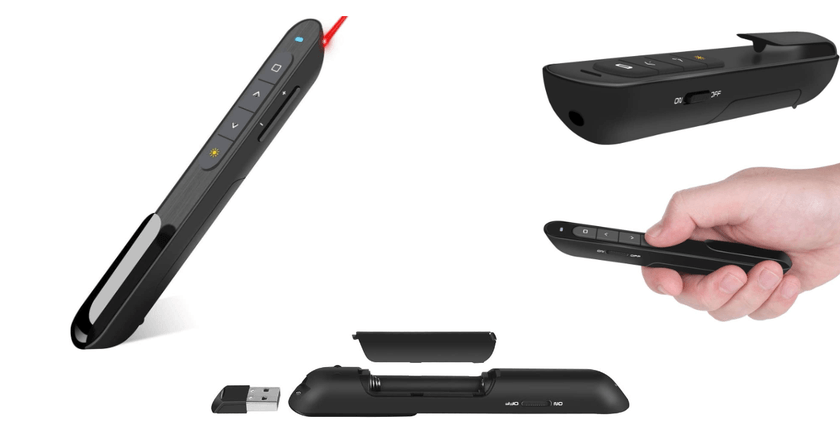
Wireless presentation clickers are small handheld devices used to control slides from a distance. They usually connect through a USB receiver, Bluetooth, or both. Most models include buttons for next slide, previous slide, blank screen, and sometimes a laser pointer.
These devices are commonly used with PowerPoint, Google Slides, Keynote, and other presentation software. Some advanced presentation remotes also include digital pointers, timers, vibration alerts, and cursor control.
Why Best Wireless Presentation Clickers Matter
The best wireless presentation clickers help presenters move freely, maintain eye contact, and engage the audience naturally. Instead of walking back to the computer again and again, the speaker can focus on explaining ideas clearly.
A positive side is that these devices improve confidence and presentation flow. A negative side is that cheap or low-quality clickers may disconnect, fail during important moments, or feel uncomfortable in the hand.
Key Features to Look For
A strong wireless range is one of the most important features. For small classrooms, a short range may be enough. For halls, conferences, or large training rooms, a longer range is better.
Battery life is also important. Some clickers use replaceable batteries, while others use rechargeable batteries. A battery indicator is a useful feature because it helps avoid sudden failure.
Laser Pointer or Digital Pointer
Many wireless presentation remotes include a red or green laser pointer. A laser pointer is useful when presenting on a projector screen, whiteboard, or wall. It helps the audience follow specific points.
However, laser pointers may not work well on some LED screens or during online meetings. In such cases, digital highlighting or on-screen pointer features are more useful because remote viewers can also see what you are pointing at.
USB, Bluetooth, or Both?
USB wireless clickers are usually simple and reliable. You plug the receiver into the laptop, and the remote starts working. This plug-and-play style is good for people who want a quick setup.
Bluetooth presentation clickers are useful for modern laptops that have fewer USB ports. Some of the best wireless presentation clickers offer both USB and Bluetooth support, giving users more flexibility.
Best Uses of Wireless Presentation Remotes
Teachers can use them to move around the classroom while explaining slides. Business professionals can use them during meetings, sales pitches, and boardroom presentations.
Students can also benefit from a wireless slide clicker during class presentations. It helps them appear more prepared and confident instead of depending on someone else to change slides.
Comfort and Button Design
A good presentation clicker should feel comfortable in the hand. Buttons should be easy to identify without looking down. This is important because presenters need to keep their attention on the audience.
A confusing button layout can cause mistakes. Pressing the wrong button during a presentation can break confidence, so simple and clear controls are always better.
Advanced Features
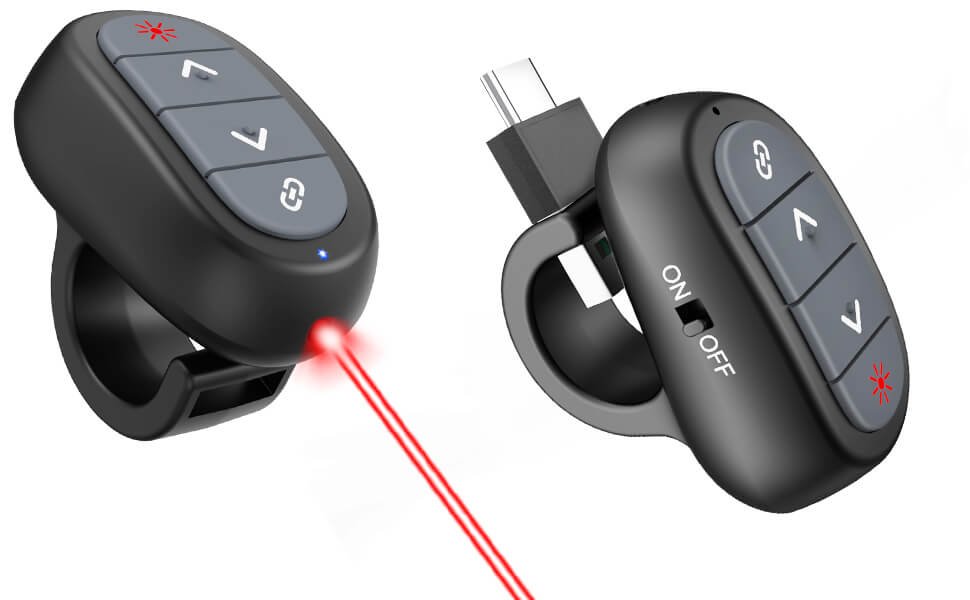
Some advanced wireless presentation clickers include timers, vibration alerts, screen blackout buttons, volume control, and cursor movement. These features are useful for professional speakers and trainers.
Still, not everyone needs advanced features. For basic classroom or office use, a simple wireless presenter with slide control and a laser pointer may be enough.
Positive and Negative Points
The positive side of the best wireless presentation clickers is that they improve freedom, confidence, and audience connection. They make presentations smoother and more natural.
The negative side is that some models may require software, have limited compatibility, or depend too much on battery life. That is why checking compatibility with Windows, Mac, PowerPoint, Keynote, and Google Slides is important.
How to Choose the Right Presentation Clicker
Choose a simple USB clicker if you need basic slide control. Choose a Bluetooth or dual-connection model if you use a modern laptop with fewer ports.
For large rooms, select a clicker with strong range. For online or hybrid presentations, choose a model with digital pointer support. For professional speaking, look for timer alerts and comfortable design.
Conclusion
Best wireless presentation clickers are small tools, but they can make a big difference in presentation quality. They help speakers move freely, control slides smoothly, and communicate with confidence.
The right choice depends on your needs. A teacher may need a simple and reliable clicker, while a business presenter may prefer advanced features. Before buying, focus on range, compatibility, comfort, battery life, and pointer style.
FAQ
What are the best wireless presentation clickers used for?
They are used to control presentation slides from a distance. They help presenters move around freely while speaking.
They are useful for classrooms, meetings, seminars, workshops, conferences, and business presentations.
Do wireless presentation clickers work with PowerPoint?
Yes, most wireless presentation clickers work with PowerPoint. Many also support Google Slides and Keynote.
However, compatibility can vary by model, so checking device support before buying is important.
Is Bluetooth better than USB for presentation clickers?
Bluetooth is better for laptops with fewer ports. It reduces the need for a USB receiver.
USB clickers are often easier to set up because they usually work through simple plug-and-play connection.
Do I need a laser pointer?
A laser pointer is useful for in-person presentations. It helps highlight important points on a screen.
For online presentations, a digital pointer may be better because remote viewers can also see it.
Are cheap wireless presentation clickers good?
Some cheap clickers work well for basic use. They can be fine for students or simple classroom presentations.
However, very cheap models may have weak range, poor buttons, or unreliable connection.
What range is good for a presentation clicker?
For small rooms, a short range is usually enough. For large halls, a longer wireless range is better.
A stronger range gives the presenter more freedom to move naturally.
Can wireless clickers work with Mac?
Many wireless clickers work with Mac, but not all features may be supported.
Always check whether the model supports Mac, Keynote, and your preferred presentation software.
What makes a presentation clicker professional?
A professional clicker has reliable range, comfortable design, strong battery life, and smooth slide control.
Advanced features like timer alerts, digital highlighting, and dual connectivity can also make it more useful.