


AI convert words to PPT tools have completely transformed the way people used to make PowerPoint presentations in the past. Now, professionals and students do not need to spend hours copying text from the documents into slides. Instead, advanced AI converters do the task from context analysis to final PPTs all by themselves.
Modern tools like TeraBox AI Presentation maker basically read the content through an algorithm, integrate automation and design aesthetics according to the theme of your document. Such tools not only transform the text. Instead, they interpret context, select the focal point and make presentations that engage and convince. Thus, it saves a lot of time and manual effort.
Part One: Productivity Challenges with Traditional Word-to-PPT Workflows
Before AI stepped in, creating slides from documents was a tedious, manual process. Teams had to:
● Manually copy and paste each section: Before AI, converting a Word document would consume hours to copy every paragraph one by one. This not only led users to waste time but the chances of mistakes were often increased.
● Adjust formatting inconsistencies: Users faced a lot of formatting issues. For instance, headings, bullet points and spacing would appear uneven and require constant adjustments.
● Insert visuals and design layouts from scratch: Adding visuals like icons and images was another time-consuming task. Users had to search for the relevant visuals and then to adjust their sizing and structure.
This traditional AI convert Word to PPT process consumed valuable working hours and often led to repetitive, low-value tasks. Professionals in marketing, academics, and corporate communication struggled to maintain consistency and visual appeal across large presentations.
Moreover, frequent revisions further slowed down productivity, as every document update required reformatting corresponding slides. With AI tools like TeraBox, this entire cycle is automated, giving teams more time to focus on strategy, creativity, and delivery.
Part Two: How AI Convert Word to PPT Transforms Content into Slides
The AI uses natural language processing (NLP) and machine learning to convert Word to PPT. The TeraBox goes through the entire document provided by you. It then identifies the key points, tone and structure. Hence, the tool helps make the slides that are visually rich and in logical order.
Here’s what makes this approach revolutionary:
1. Semantic Understanding
Firstly, the AI read the entire document uploaded by you. It completely understands the meaning of the context and then points out the heading, subpoint and examples. This gives your slides an organized structure with purposeful headings and well formatted texts.
2. Auto Summarization
When shortening long sections one must be careful not to cut off any necessary and important points, that’s when the AI comes for the review. It assists in shortening the long section while keeping the actual message intact. This ensures your presentation is on point, informative and easy to read without any unnecessary phrases.
3. Design Optimization
TeraBox understands the purpose behind each of the documents. Therefore it only provides slides templates and fonts that align with the idea of your presentation. For example, it charts based templates for data-heavy contexts.
In contrast, it provides a colorful design for creative and fun topics. Plus you don’t have to do any manual adjustments; it does it all for you with one click. This increases the relevance between the visuals and the information, giving our slides a professional look.
4. Editable Output:
Every generated slide remains fully editable in PowerPoint or directly within the online TeraBox editor. Users can modify visuals, change colours, or add new sections very easily. Hence, you get complete control over the customization supported with the efficiency of AI.
Unlike basic PPT to Word converter tools, which simply shift text between formats, TeraBox transforms content meaningfully. It emphasizes clarity, flow, and visual impact. The motive is not only to turn the file into slides, but to provide you with polished results with enhanced visuals and highly professional design very fast and efficiently, without the hassle of manual work.
Part Three: Creative Visualization and Real-World Applications
AI-powered Word-to-PPT tools open a world of creative possibilities. Whether it’s a corporate strategy deck or a classroom presentation, automation enhances productivity and aesthetics. While it used to take hours of work and mental exhaustion, it can now be done in just a few minutes. Hence the users can focus on story telling instead of wasting time on the formatting.
Key applications include:
1. Educators
The innovation is highly beneficial for educators. They can now turn their notes and lesson plans into well structured presentations with clear bullets. Additionally, it increases the visuals with added icons and other elements, assisting in better engagement. Teachers can easily update or reuse slides each semester, saving precious time.
2. Marketing Teams
Turn research documents into vibrant client presentations. Therefore the terabox is really helpful to marketers to create visual harmony across campaigns. Therefore, every pitch is visually rich and professional.
3. Business Professionals
The AI automatically highlights insights, KPIs, and summaries. Therefore, it quickly visualizes project reports, quarterly updates, or proposals, making the meetings more focused and effective.
4. Students:
The AI assists in creating organized notes. It further helps make the class presentations visually appealing with clear points and study summaries. Prepare class presentations, group projects, and summaries easily with structured points, relevant imagery, and smooth slide transitions. With this, students can create well structured presentations even at the last minute.
TeraBox’s convert Word to PPT feature ensures your presentation not only looks great but also communicates ideas clearly. The built-in AI themes enhance colour palettes, spacing, and design consistency across all slides — making them audience-ready instantly.
Part Four: Step-by-Step Guide – Using AI Convert Word to PPT with TeraBox
Creating professional presentations with TeraBox is effortless. Follow these simple steps:
1. Login: Open TeraBox on your PC or web browser.
2. Access the Tool: Navigate to the “AI Presentation Agent” or “Word to PPT” feature.
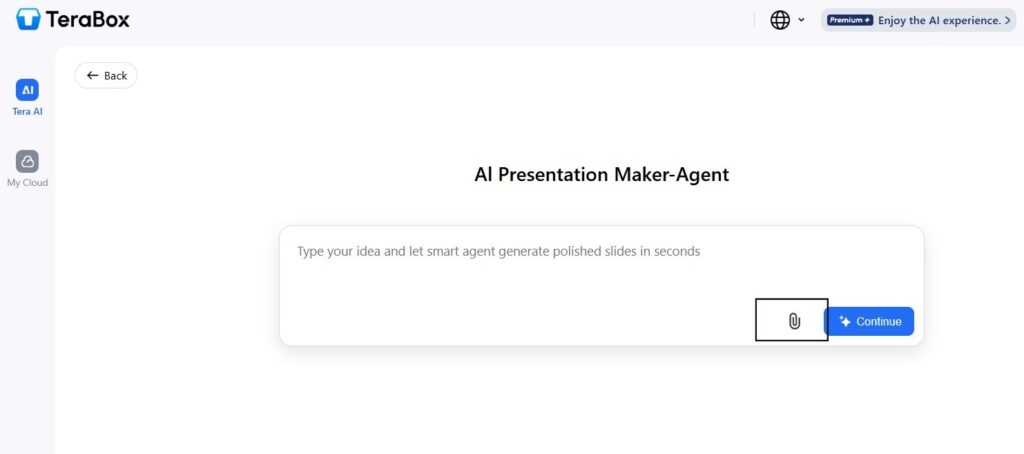
3. Upload Your File: Drag and drop your Word document into the upload box.
4. Wait until the file gets loaded, and then click: Continue.
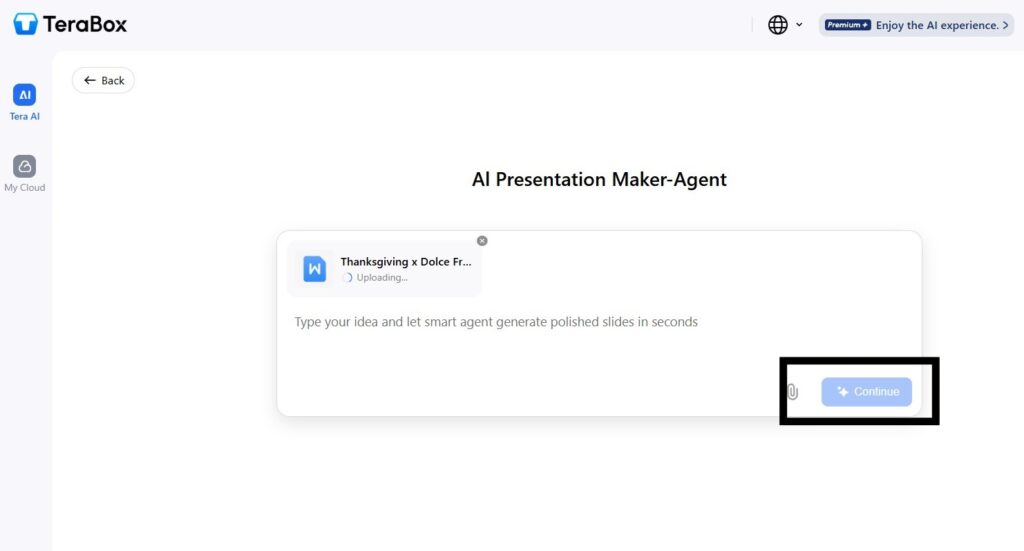
5. AI Processing: The AI analyzes, summarizes, and converts your content into slides automatically.
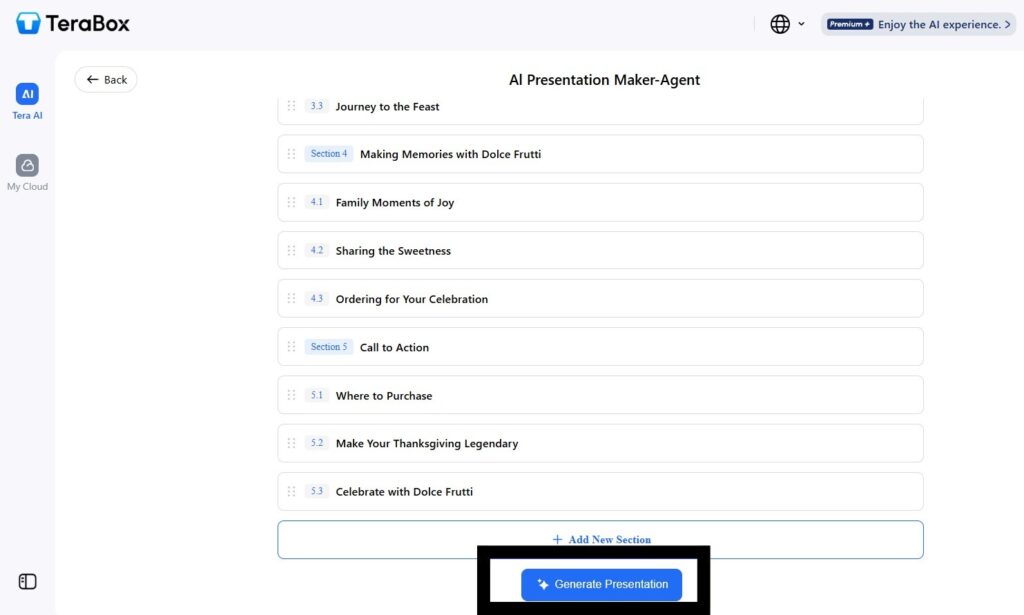
6. Review & Edit: Adjust layouts, add visuals, or tweak colours as desired.
7. Export or Share: Download as a PowerPoint file or share it directly via TeraBox Cloud.
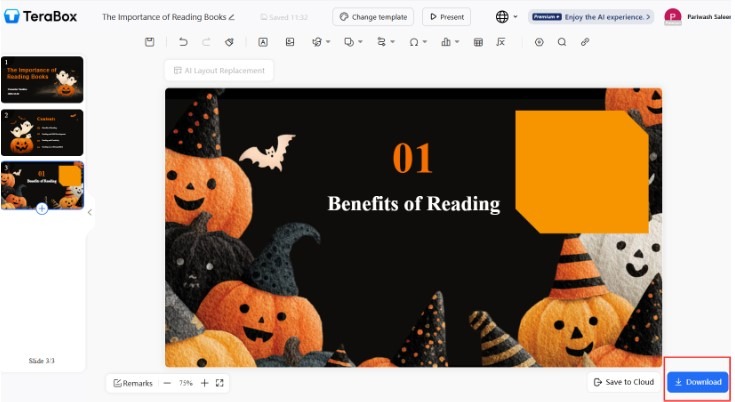
In less than a minute, your static document becomes a dynamic presentation — editable, aesthetic, and professional.
Part Five: Tips to Maximize AI Word-to-PPT Efficiency
To get the most from TeraBox’s AI presentation maker:
● Use Clear Headings: AI performs best when documents have defined headings and sections.
● Insert Visual Cues: Add images or icons in Word; TeraBox includes them automatically in the slides.
● Maintain Simple Formatting: Avoid excessive styles that may confuse the conversion logic.
● Refine After Conversion: Use AI suggestions, but personalize slides with your branding and tone.
● Leverage Cloud Collaboration: Work simultaneously with teammates on shared TeraBox slides.
These small optimizations can significantly enhance accuracy and visual output, turning your presentation workflow into a seamless digital experience.
Why TeraBox Leads the Future of AI Presentation Tools
TeraBox stands out not just for its conversion accuracy but also for its cloud-powered design intelligence. Unlike standalone converters, TeraBox integrates:
● Real-time storage synchronization
● Secure file management
● AI-powered layout assistance
● Team collaboration features
Thus, ensuring that every presentation is consistent, accessible, and professional. TeraBox doesn’t replace creativity — it enhances it.
Conclusion
In a nutshell, AI-powered tools like TeraBox AI convert Word to PPT are today transforming how people work. Such tools enable professionals, teachers, educators and creators to turn static Word documents into visually engaging and story-driven slides within a few minutes.
Hence, by combining the services with layout intelligence and cloud collaborations, users can now save hours of their time while maintaining quality and consistency. The days of manual slide creation are behind us — TeraBox ensures your presentations always stay a step ahead.